Build an ESP32 energy monitor with CT clamps
Clamp-on current sensors let an ESP32 measure how much power a circuit uses without cutting a single wire. Track your dryer, water heater, heat pump or EV charger, and see the results in Home Assistant's Energy dashboard.
Read this first. CT clamps fit inside your electrical panel, and removing the panel cover exposes live parts. Even with the main breaker off, the wires coming in from the meter stay live. If you aren't qualified to work in a panel, have an electrician fit the clamps; it takes them a few minutes. Everything on the ESP32 side is low voltage and safe to build on your bench.
How CT clamps work
A current transformer (CT) clamp opens and closes around a single wire. The current in that wire makes a small signal in the clamp, proportional to the load. This guide uses SCT-013 clamps with a voltage output, such as the SCT-013-030, which gives 1 V at 30 A. These have the burden resistor built in, so they're safe to unplug while clamped on a live wire.
Avoid the SCT-013-000 for this build. It has a current output, and unplugging it while clamped on a live wire can produce dangerous voltages.
What to clamp
- Clamp one wire, not a whole cable. Around a cable, the outgoing and returning currents cancel out and the clamp reads zero.
- 120 V circuits: clamp the hot wire, usually black, from the breaker.
- 240 V appliances (dryer, water heater, range, many heat pumps): clamp just one of the two hots and set the voltage to 240. For pure 240 V loads, both legs carry the same current.
- Whole-house monitoring means clamping the main feeds, which on a 100–200 A service is beyond the 30–60 A SCT-013 range. For that, a ready-made board with 200 A clamps that runs ESPHome, such as CircuitSetup's expandable ESP32 energy meter, is the better route.
Parts
- An ESP32 DevKit and USB power supply.
- One SCT-013-030 (1 V output) per circuit. Pick a rating just above the circuit's breaker; the SCT-013-050 is 1 V at 50 A.
- One 3.5 mm audio jack breakout per clamp, to plug the clamp in.
- Two 10 kΩ resistors and one 10 µF capacitor for the bias circuit, which all the clamps can share.
- ESP32 DevKitView on AmazonPhoto: Edwiyanto, CC BY-SA 4.0

- SCT-013-030 CT clamp (1 V output)
- 3.5 mm audio jack breakout
- Resistor assortmentView on AmazonPhoto: Afrank99, CC BY-SA 2.5

- 10 µF capacitorPhoto: Elcap, CC0

- 5 V USB power supplyView on AmazonPhoto: Сергей Михель, CC BY-SA 3.0

The bias circuit
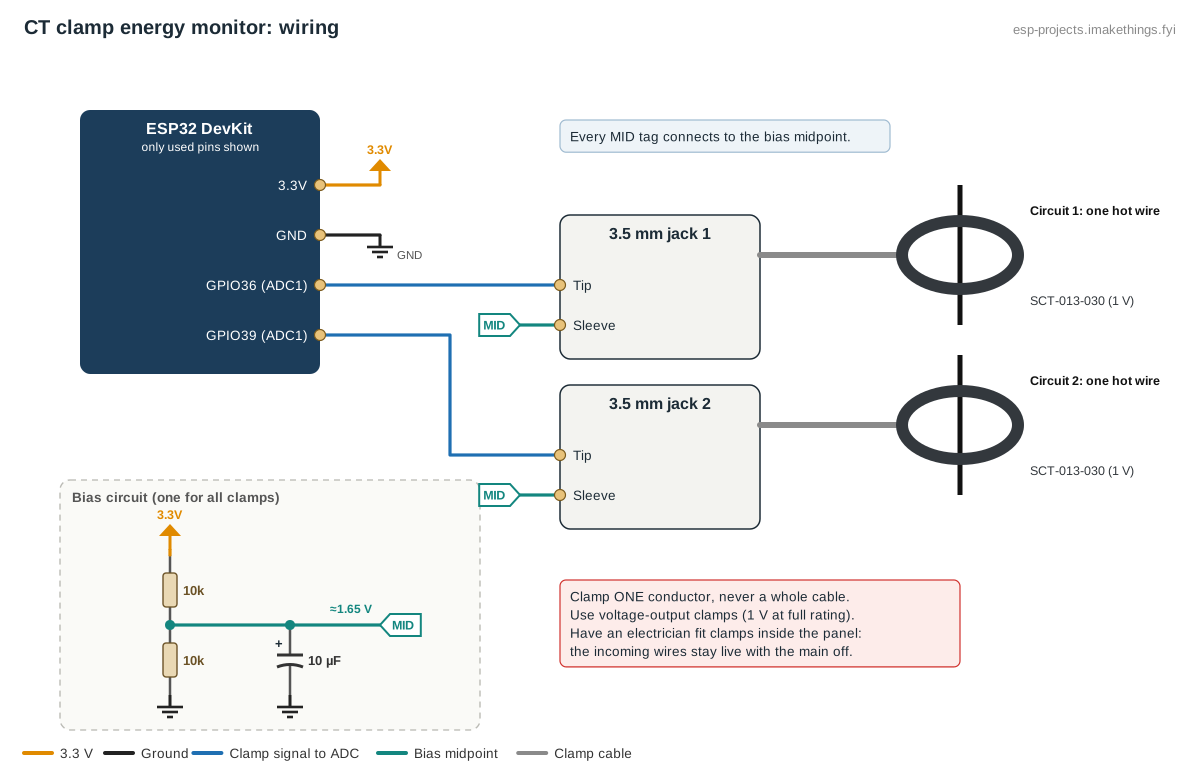
A clamp's output swings above and below zero, but the ESP32 can only read voltages between 0 and 3.3 V. The fix is to lift the clamp's signal to the middle of that range:
- Connect two 10 kΩ resistors in series between 3.3V and GND. The point between them sits at about 1.65 V.
- Connect the 10 µF capacitor from that midpoint to GND, to keep it steady.
- For each clamp, connect one jack terminal to the midpoint and the other to an ADC1 pin: GPIO36, 39, 34, 35, 32 or 33.
A 30 A clamp at full load swings ±1.4 V around 1.65 V, which stays inside the ESP32's input range.
Build this config in the generator
The ESPHome config
This measures two 120 V circuits and adds them up. ESPHome's ct_clamp sensor samples the waveform for 200 ms and works out the current.
sensor:
  - platform: adc
    id: ct_adc_1
    pin: GPIO36
    attenuation: 12db
    update_interval: never
    internal: true
  - platform: ct_clamp
    sensor: ct_adc_1
    id: ct_current_1
    name: "Dryer current"
    sample_duration: 200ms
    update_interval: 10s
    filters:
      - multiply: 30        # 30 A clamp with 1 V output
      - lambda: 'return x < 0.15 ? 0.0 : x;'   # ignore ADC noise at no load
  - platform: template
    id: ct_power_1
    name: "Dryer power"
    unit_of_measurement: W
    device_class: power
    state_class: measurement
    update_interval: 10s
    lambda: return id(ct_current_1).state * 240;

  - platform: adc
    id: ct_adc_2
    pin: GPIO39
    attenuation: 12db
    update_interval: never
    internal: true
  - platform: ct_clamp
    sensor: ct_adc_2
    id: ct_current_2
    name: "Freezer circuit current"
    sample_duration: 200ms
    update_interval: 10s
    filters:
      - multiply: 30
      - lambda: 'return x < 0.15 ? 0.0 : x;'
  - platform: template
    id: ct_power_2
    name: "Freezer circuit power"
    unit_of_measurement: W
    device_class: power
    state_class: measurement
    update_interval: 10s
    lambda: return id(ct_current_2).state * 120;

  - platform: template
    id: ct_power_total
    name: "Total power"
    unit_of_measurement: W
    device_class: power
    state_class: measurement
    update_interval: 10s
    lambda: return id(ct_power_1).state + id(ct_power_2).state;
  - platform: total_daily_energy
    name: "Energy today"
    power_id: ct_power_total
    unit_of_measurement: kWh
    device_class: energy
    state_class: total_increasing
    filters:
      - multiply: 0.001

time:
  - platform: homeassistant
    id: ha_time
Note the voltage in each power line: 240 for the dryer, a 240 V appliance, and 120 for an ordinary circuit. The generator uses one voltage for every clamp, so edit these lines if your circuits differ.
Calibrate it
- Switch on a load you know, such as a 1500 W space heater, which draws about 12.5 A at 120 V. If you have a clamp meter, use it on the same wire for the true figure.
- Compare the ESPHome current reading. Adjust the
multiplyvalue by the ratio: new value = 30 × true amps ÷ reported amps. - With the load off, check the reading returns to zero. If small values still flicker through, raise the 0.15 noise cutoff a little.
How accurate is it?
Power here is current × a fixed voltage, which is apparent power. That's close to the truth for heaters, water heaters, dryers and ovens. For motors, compressors and electronics it reads high, sometimes by 10–30%, because it can't see the power factor. Real voltage also wanders a few percent. It's excellent for spotting what's running and comparing day to day, but don't expect it to match your utility bill exactly. Boards with a dedicated energy-metering chip measure true power if you need that.
Using it in Home Assistant
- Add Energy today under Settings → Dashboards → Energy as individual device consumption.
- Appliance finished: notify when Dryer power drops below 10 W for 3 minutes after running above 500 W.
- Freezer health: a freezer that runs almost constantly is struggling. Watch its circuit's daily energy creep up, and pair it with the freezer alarm.