Build a battery-powered mailbox notifier with an ESP32
Get a phone notification the moment the mail arrives, from a sensor that runs on a small battery for a year or more. The trick is deep sleep: the ESP32 does nothing at all until the lid opens.
How it works
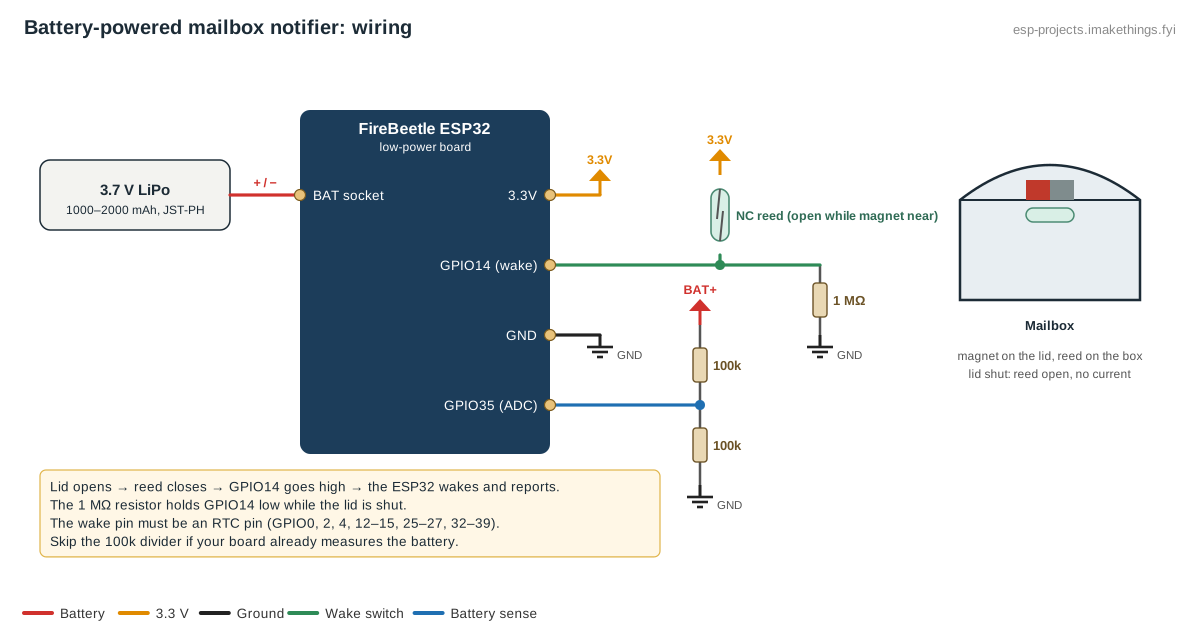
Most of the time the ESP32 is in deep sleep, drawing about 10 µA on a good low-power board. A magnetic reed switch on the lid is wired to a wake-up pin. When the lid opens, the switch closes, the ESP32 wakes, joins Wi-Fi, tells Home Assistant the mailbox was opened, and goes back to sleep after 20 seconds.
Because the board only ever wakes when the lid opens, every wake-up means the mailbox was opened. Fitting a fresh battery also counts once, so expect one false alert then.
Check your Wi-Fi first
Stand at the mailbox with your phone and look at the Wi-Fi signal. If it's weak or drops out, fix that first, for example with an outdoor access point or a mesh node in a window facing the street. A metal mailbox blocks Wi-Fi, so on a metal box mount the electronics in a plastic box under or beside it, with only the reed switch inside.
Parts
- A low-power ESP32 board, such as the DFRobot FireBeetle ESP32. Ordinary DevKits waste several milliamps in sleep through their USB chip and regulator, which flattens a battery in days. Tests of the FireBeetle measured about 10 µA in deep sleep.
- A 3.7 V LiPo battery, 1000–2000 mAh, with a JST-PH plug to fit the FireBeetle's battery socket and charger.
- A reed switch that's open while the magnet is next to it, sold as normally closed (NC) or "Form B", plus a magnet. With this type, no current flows while the lid is shut.
- Two 100 kΩ resistors to measure the battery (skip these if your board has a built-in battery divider), and one 1 MΩ resistor.
- A small weatherproof plastic enclosure.
- FireBeetle ESP32 (low-power board)
- 3.7 V LiPo battery, JST-PH plug
- NC reed switch (open with magnet)Photo: André Karwath, CC BY-SA 2.5
.jpg/500px-Reed_switch_(aka).jpg)
- Resistor assortmentView on AmazonPhoto: Afrank99, CC BY-SA 2.5

- Plastic project enclosure
Wiring
| Connection | Between |
|---|---|
| Reed switch | GPIO14 and 3.3V |
| 1 MΩ resistor | GPIO14 and GND (keeps the pin low while the lid is shut) |
| Battery divider | Battery + → 100 kΩ → GPIO35 → 100 kΩ → GND |
| Battery | The board's battery socket |
Mount the magnet on the lid and the reed switch on the box, so they line up within a centimeter when the lid is shut. The wake-up pin must be an RTC pin: on a classic ESP32 that's GPIO0, 2, 4, 12–15, 25–27 or 32–39. GPIO14 is a good choice.
Build this config in the generator
The ESPHome config
esphome:
  on_boot:
    priority: -100
    then:
      # The board only wakes when the lid opens, so every boot means mail
      - wait_until:
          condition:
            api.connected:
          timeout: 15s
      - binary_sensor.template.publish:
          id: mail_event
          state: ON
      - delay: 3s
      - binary_sensor.template.publish:
          id: mail_event
          state: OFF

deep_sleep:
  id: mailbox_sleep
  wakeup_pin:
    number: GPIO14
    mode:
      input: true
      pulldown: false
  wakeup_pin_mode: KEEP_AWAKE
  run_duration: 20s

binary_sensor:
  - platform: template
    id: mail_event
    name: "Mailbox opened"
    device_class: opening

sensor:
  - platform: adc
    pin: GPIO35
    id: battery_v
    name: "Battery voltage"
    attenuation: 12db
    update_interval: 60s
    filters:
      - multiply: 2.0
KEEP_AWAKE handles the lid being left open: instead of waking straight back up in a loop, the board stays awake until the lid closes, then sleeps.
Flash the board over USB first, and do any later updates the same way or during the 20-second awake window. A sleeping device can't receive an over-the-air update.
Battery life
Asleep at 10 µA, the board uses about 0.24 mAh a day. Each wake-up costs roughly 0.5 mAh, mostly from Wi-Fi. At four openings a day that's about 2.5 mAh a day, so a 2000 mAh battery lasts well over a year on paper. Cold weather and the battery's own self-discharge cut into that, so expect around a year in practice. LiPo batteries mustn't be charged below freezing, so bring it indoors to recharge in winter.
Home Assistant automations
"You've got mail", once
The mailbox opens twice a day: once for the delivery and once when you collect it. Track which is which with a helper:
- Create a toggle helper called Mail waiting.
- When Mailbox opened turns on and Mail waiting is off, send "You've got mail" and turn Mail waiting on.
- When Mailbox opened turns on and Mail waiting is on, it's you collecting it, so turn Mail waiting off.
Show Mail waiting on a dashboard or a light near the door.
Low battery
Notify when Battery voltage drops below 3.5 V, which leaves a few weeks to recharge.