Build a smart sprinkler controller with an ESP32 and ESPHome
Replace a dumb irrigation timer with an ESP32 and a relay board, and let Home Assistant skip watering when it has rained or the soil is already wet. ESPHome's built-in sprinkler controller handles the zone sequencing, so it keeps working even if Home Assistant is down.
How residential sprinklers are wired
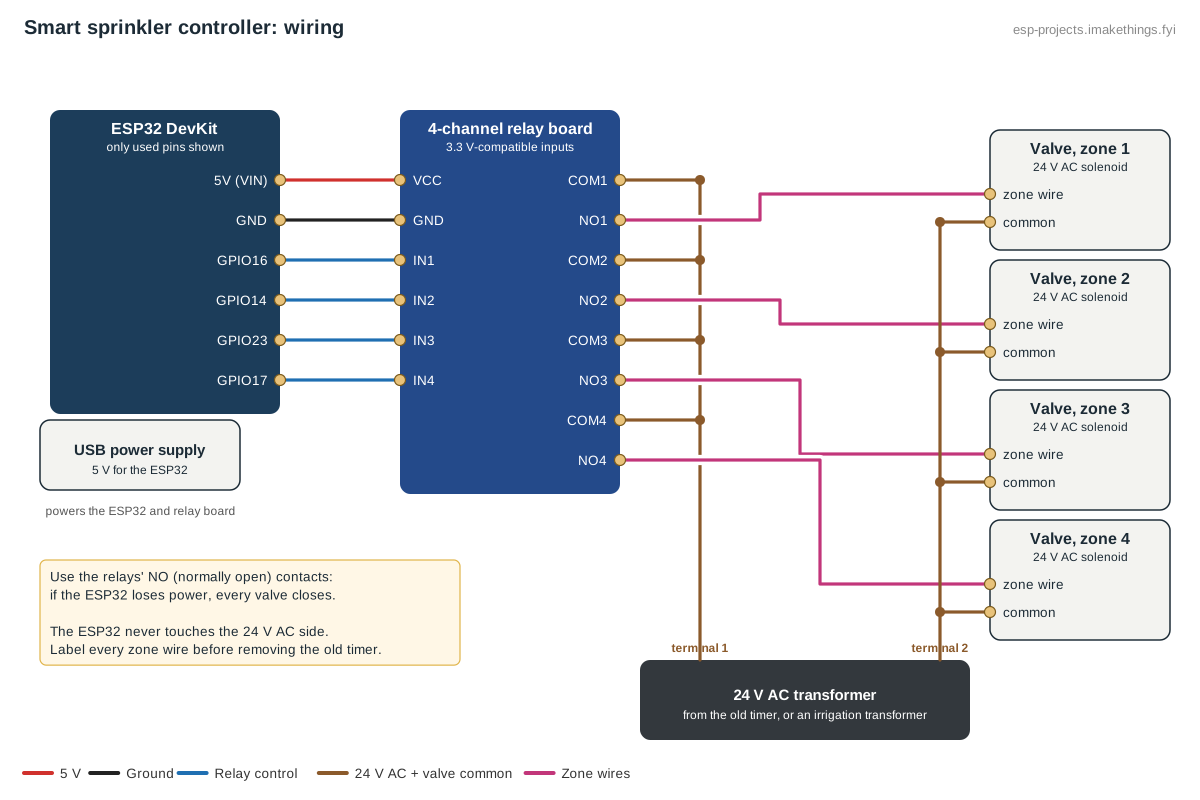
Almost all home irrigation valves are 24 V AC solenoids. Your existing timer has a 24 V AC transformer, one common wire shared by all the valves, and one wire per zone. The timer opens a zone by connecting 24 V AC to that zone's wire. The relays do exactly that job here; the ESP32 only switches the relays and never touches the 24 V side.
Parts
- An ESP32 DevKit and a 5 V USB supply.
- A relay board with one relay per zone. Get one with optocoupled inputs that works with 3.3 V signals.
- A 24 V AC transformer. Reuse the one from your old timer, or buy an irrigation transformer.
- An enclosure that keeps the electronics dry, mounted where the old timer was.
- ESP32 DevKitView on AmazonPhoto: Edwiyanto, CC BY-SA 4.0

- 4- or 8-channel relay boardPhoto: Suyash Dwivedi, CC BY-SA 4.0

- 24 V AC irrigation transformer
- 24 V AC sprinkler valve
- Plastic project enclosure
- 5 V USB power supplyView on AmazonPhoto: Сергей Михель, CC BY-SA 3.0

Wiring
- Label every zone wire and the common wire before you take them off the old timer. Photograph the terminals too.
- Transformer terminal 1 goes to the COM terminal of every relay. Link them with short jumpers.
- Each zone wire goes to the NO (normally open) terminal of its relay.
- Transformer terminal 2 goes to the valves' common wire.
- Relay board inputs IN1, IN2, … go to the ESP32 pins, with the board's VCC and GND to the ESP32's 5V and GND.
Using normally open contacts means a valve can only open while its relay is energized. If the ESP32 crashes or loses power, every valve closes.
If your system has a pump or master valve, wire it to another relay; ESPHome's sprinkler component can switch it automatically with pump_switch_id. Irrigation connected to drinking water needs a backflow preventer; if you're replacing an existing timer, the system already has one.
Build this config in the generator
The ESPHome config
Four zones, ten minutes each. The GPIO switches are internal; you control everything through the sprinkler controller's own switches.
switch:
  - platform: gpio
    id: valve_1
    pin: GPIO16
    restore_mode: ALWAYS_OFF
    internal: true
  - platform: gpio
    id: valve_2
    pin: GPIO14
    restore_mode: ALWAYS_OFF
    internal: true
  - platform: gpio
    id: valve_3
    pin: GPIO23
    restore_mode: ALWAYS_OFF
    internal: true
  - platform: gpio
    id: valve_4
    pin: GPIO17
    restore_mode: ALWAYS_OFF
    internal: true

sprinkler:
  - id: irrigation
    main_switch: "Sprinklers"
    auto_advance_switch: "Sprinklers auto advance"
    valves:
      - valve_switch: "Front lawn"
        enable_switch: "Front lawn enabled"
        run_duration: 10min
        valve_switch_id: valve_1
      - valve_switch: "Back lawn"
        enable_switch: "Back lawn enabled"
        run_duration: 10min
        valve_switch_id: valve_2
      - valve_switch: "Garden beds"
        enable_switch: "Garden beds enabled"
        run_duration: 10min
        valve_switch_id: valve_3
      - valve_switch: "Side yard"
        enable_switch: "Side yard enabled"
        run_duration: 10min
        valve_switch_id: valve_4
Many relay boards switch on when the input goes low. If a zone runs when it should be off, add inverted: true to that valve's switch. Test each zone from Home Assistant before trusting the schedule.
How to use it
- Sprinklers runs every enabled zone in turn, each for its run duration.
- Front lawn and the other zone switches run one zone on its own, handy for testing or a quick top-up.
- … enabled switches remove a zone from the full cycle without deleting it, for example a bed you've just planted.
The run times live on the ESP32, so a cycle that has started finishes correctly even if Home Assistant restarts mid-way.
Smarter scheduling in Home Assistant
- Schedule: an automation turns on Sprinklers at 5:30 a.m. on your watering days. Early morning loses the least water to evaporation and wind.
- Skip after rain: add a condition using your weather integration, skipping the run if more than about 5 mm (0.2 in) fell in the last day or is forecast today.
- Skip when the soil is wet: a soil moisture sensor in a representative bed gives the most direct answer.
- Freeze protection: skip when the forecast low is near freezing, so you don't ice the sidewalk.
How many zones?
An ESP32 DevKit drives up to six relays without using its boot-sensitive pins. The config generator goes to eight and picks free pins for you, warning if any land on a strapping pin. For more zones, an I2C relay board or a GPIO expander is the tidier route.