Build a PM2.5 air quality monitor with a PMS5003 and ESPHome
Fine particles from cooking, candles, wildfire smoke and dust are invisible, but a $20 laser particle counter can see them. This build reports PM1, PM2.5 and PM10 plus the US Air Quality Index to Home Assistant, which can then switch on an air purifier for you.
What PM2.5 is
PM2.5 is the mass of particles smaller than 2.5 micrometers in each cubic meter of air, in µg/m³. They're small enough to get deep into the lungs, which is why they're the headline number in air quality reports. The PMS5003 draws air through with a small fan and counts particles by the laser light they scatter.
Parts
- An ESP32 DevKit and a 5 V USB supply.
- A Plantower PMS5003. Buy one that comes with its breakout adapter and cable: the sensor's own connector is a tiny 1.25 mm plug.
- Optional: a BME280 for temperature and humidity, which helps you make sense of the readings (see below).
- ESP32 DevKitView on AmazonPhoto: Edwiyanto, CC BY-SA 4.0

- PMS5003 particle sensor with adapterView on Amazon
- BME280 sensor boardView on AmazonPhoto: SparkFun, CC BY 2.0

- Female-to-female jumper wiresView on AmazonPhoto: oomlout, CC BY-SA 2.0

- 5 V USB power supplyView on AmazonPhoto: Сергей Михель, CC BY-SA 3.0

Wiring
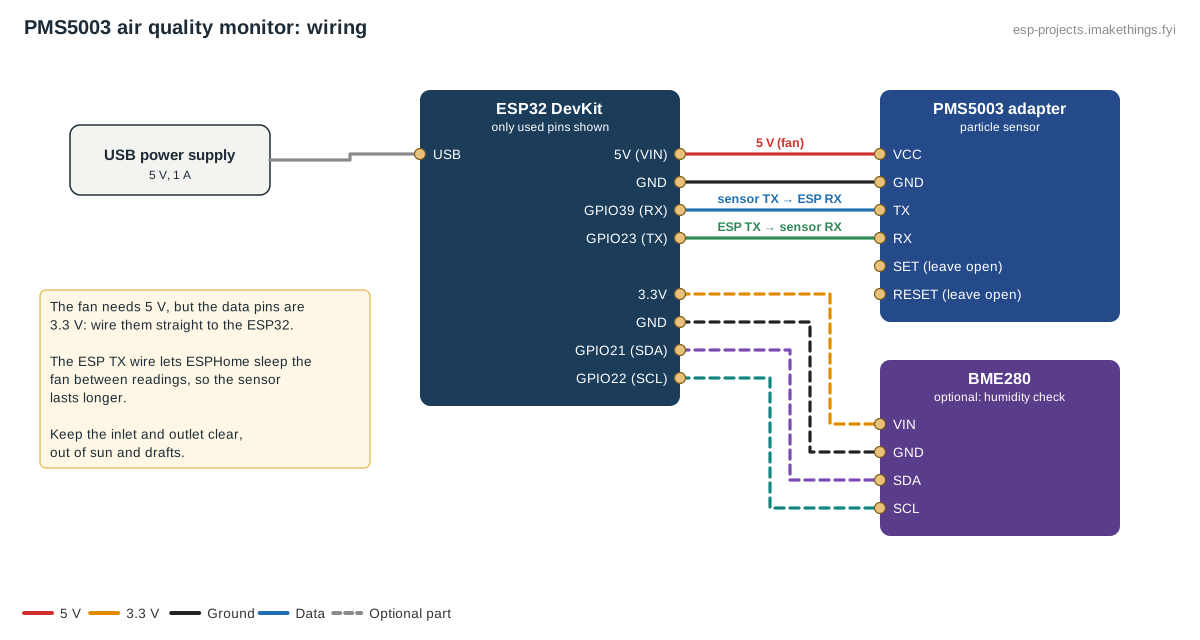
| PMS5003 (adapter) | ESP32 |
|---|---|
| VCC | 5V (VIN) |
| GND | GND |
| TX | GPIO39 |
| RX | GPIO23 |
| SET, RESET | Leave unconnected |
The fan needs 5 V, but the data pins work at 3.3 V, so they connect straight to the ESP32 with no level shifter. The BME280, if used, goes on the I2C pins: SDA to GPIO21, SCL to GPIO22.
Build this config in the generator
The ESPHome config
uart:
  - id: pms_uart
    tx_pin: GPIO23
    rx_pin: GPIO39
    baud_rate: 9600

i2c:
  sda: GPIO21
  scl: GPIO22

sensor:
  - platform: pmsx003
    uart_id: pms_uart
    type: PMSX003
    pm_1_0:
      name: "PM1.0"
    pm_2_5:
      id: pm25
      name: "PM2.5"
    pm_10_0:
      id: pm10
      name: "PM10"
    update_interval: 120s
  - platform: aqi
    name: "Air quality index"
    pm_2_5: pm25
    pm_10_0: pm10
    calculation_type: AQI
  - platform: bme280_i2c
    address: 0x76
    temperature:
      name: "Temperature"
    humidity:
      name: "Humidity"
    pressure:
      name: "Pressure"
    update_interval: 60s
With update_interval over 30 seconds and the ESP32's TX wired to the sensor, ESPHome puts the fan to sleep between readings. The fan and laser wear with use, so ESPHome recommends 120 seconds or more.
What the numbers mean
These are the US EPA's PM2.5 breakpoints, updated in 2024. The AQI sensor in the config converts readings to this scale for you.
| PM2.5 (µg/m³) | AQI | Category |
|---|---|---|
| 0.0–9.0 | 0–50 | Good |
| 9.1–35.4 | 51–100 | Moderate |
| 35.5–55.4 | 101–150 | Unhealthy for sensitive groups |
| 55.5–125.4 | 151–200 | Unhealthy |
| 125.5–225.4 | 201–300 | Very unhealthy |
| 225.5 and up | 301+ | Hazardous |
The official AQI uses 24-hour averages. A live indoor reading jumps around: frying food can briefly push PM2.5 into the hundreds. Use the trend, not a single spike.
Placement and quirks
- Keep the inlet and outlet clear, out of direct sun and drafts, and not right next to the stove unless you want a cooking monitor.
- High humidity reads high. Laser counters see fog and water droplets as particles, so readings inflate when humidity is very high. That's what the BME280 is for: if PM2.5 and humidity rise together on a damp morning, it's probably moisture.
- Cheap sensors vary from unit to unit. They're good for trends and comparisons, not lab-grade measurements.
Home Assistant automations
- Run the purifier: turn on a smart-plug air purifier when PM2.5 stays above 12 µg/m³ for 10 minutes, and off when it's below 5 for 20 minutes.
- Smoke alert: notify when the AQI goes over 100 — useful in wildfire season to know when to close windows.
- Pair it with the CO2 monitor: CO2 tells you when to bring fresh air in, PM2.5 tells you when not to.